

The Scriptation & Shamel Studio Integration!
The Scriptation & Shamel Studio integration is HERE! Scriptation’s collaboration with Shamel Studio allows two of your goated production tools to work together seamlessly. This team-up is all about making your preparation, pre-production, and shoots even smoother thanks to the pairing of Shamel Studio’s amazing production tools with Scriptation’s one-of-a-kind optimizations.
Whether you’re a UPM, assistant director, APOC, producer, or anyone trying to schedule, budget, and organize a production, this integration will save you hours of manual data entry and keep your production workflow its most efficient yet.
New to Shamel Studio? They offer ‘lightening-fast’ film scheduling and budgeting, taking users ‘from script to set in no time‘. Want to get started already? Then read on for all the ways the Scriptation and Shamel Studio integration is making life easier for film and TV production:
Shamel Studio is the production tool that allows users to create production schedules, budgets, and call sheets twelve times faster, without the headaches.

This Scriptation & Shamel Studio integration automatically exports all the scene data one would normally spend manually entering, such as:
- Scene Number and Description
- Set Name
- Interior/Exterior Label
- Story Day
- Scene Page Count
- Day/Night Label
- Cast/Character Name
In addition to the above crucial scene data, this integration also exports all of your other Scriptation tagging categories, allowing you to quickly build shooting schedules with department-specific needs – for each scene!
Key Benefits of the Scriptation & Shamel Studio Integration
Save Time: Eliminate hours of manual data entry by importing existing breakdowns instead of recreating them for every revised draft
Seamless Workflow: Move naturally from script analysis in Scriptation to production scheduling, call sheet building, and budgeting builds in Shamel Studio
Maintain Accuracy: Reduce errors that come from retyping information between systems; creating opportunity for mistakes & longer hours
Stay Current: As your script revisions roll in, simply re-export and update your Shamel Studio project with the latest production breakdown, and you’re good to go
Start with Scriptation…
The Scriptation & Shamel Studio integration makes it easy to transfer your detailed Scriptation script breakdown data directly into Shamel Studio. You’ll start with using Scriptation’s Tagging features for the fastest, most efficient way to breakdown scripts for production:
The Scriptation & Shamel Studio Integration works in two simple steps:
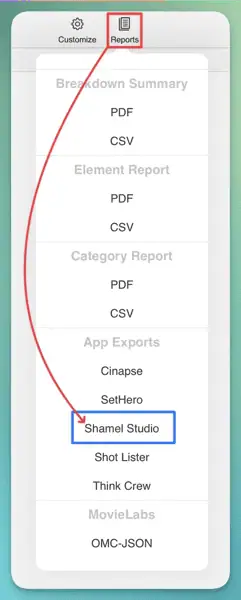
1) Export Your Scene Data from Scriptation
- Open your marked-up script in Scriptation
- Click the “Tag” button in the top header
- Select “Reports” (the stack of papers icon)
- Scroll down and select “Shamel Studio”
- Save the .SSS file (Scriptation Shamel Studio format) to your device!
2) Import into Shamel Studio
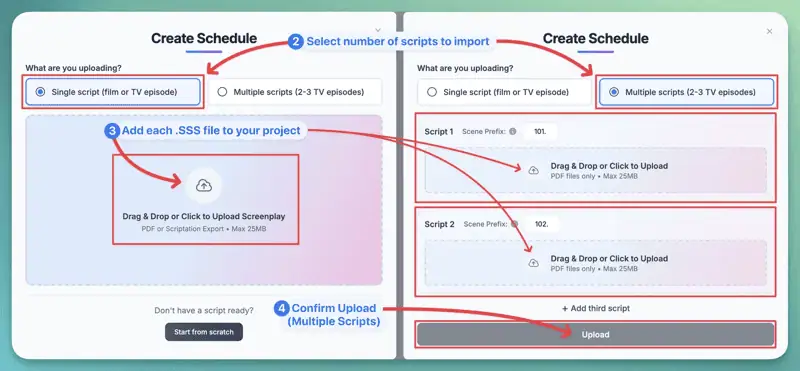
- Click “Create Schedule” with your project in Shamel Studio
- Select the number of scripts you’re importing
-
Select and upload your exported .SSS file(s) from your device:
-
If importing a single script: After selecting your .SSS file, your upload will begin automatically to complete your import! NOTE: If importing multiple scripts: Select each .SSS file and update the script’s accompanying Scene Prefix. Then, proceed to Step 5.
-
(Multiple Scripts Only) After selecting each .SSS file, click the Upload button to complete your import!
Your script; with the all the scene data, tagged elements, and breakdown information, will then appear in Shamel Studio! Now you can create schedules that automatically include all your tagged elements from Scriptation. Every scene arrives with its cast, props, locations, and notes exactly as you tagged them.
And you can roll all of this data right into making call sheets, too!
SCRIPTATION & SHAMEL STUDIO INTEGRATION FAQ
Do I need both Scriptation and Shamel Studio accounts to use this integration?
Yes, you need active accounts on both platforms to use the Scriptation & Shamel Studio integration features, but lucky for you both apps offer free versions to make your production life that much easier. To access Shamel Studio’s integration from Scriptation, you need to be an Industry Pro subscriber; but there’s a free trial waiting for new users to try before you buy.
What happens if I update my script in Scriptation?
New script? New breakdown. You’ll need to export the updated breakdown and re-import it into Shamel Studio, using the same steps as the first go-round.
Will the integration transfer my custom elements from Scriptation?
Yes, mostly; we never know what custom stamps or images users may come up with, so we can’t guarantee they’ll always seamlessly transfer over. If something is missing, or off, let us know by contacting our support team!
Is there a limit to how much data I can transfer between platforms?
The limit has yet to be reached! Whether you’re working on a short or a massive feature, this integration handles projects of any size or scope.
Can I try the integration before committing to both platforms?
Yes, as mentioned, both Scriptation (free trial) and Shamel Studio (free plan) give you the chance to test drive the workflow ahead of any purchase.
What types of productions is this integration best for?
The Scriptation and Shamel Studio integration is perfect for any production requiring detailed script analysis — features, TV, shorts, commercials, etc. The more complex your script breakdown, the more this integration streamlines your workflow and saves you time on your production scheduling, budgeting, call sheets, and more!
Have an idea for a feature you’d like to see? Then be sure to visit Scriptation on Canny, where you can review other users’ suggestions as well as make your own!
Keep an eye on the Scriptation blog and in-app Notification Center for more exciting updates for 2026!