
10 Best Free Screenwriting Software Options for 2026
The best free screenwriting software can take you from a blinking cursor to FADE OUT without spending a dime. The bad news? “Free” means something different to every developer of a Final Draft alternative. Some free plans cap you at one script, some watermark your PDF (not in a cool way), and some are free forever because a very generous developer decided the world needed one more open source app and one less ‘free Movie Magic Screenwriter download?’ search queue.
So we tested the field and sorted out what you actually get with each free screenwriting software entry. Every app below formats your screenplay to the industry standard, exports a clean script (or tells you exactly what the catch is), and works for a real screenwriter process.
Writing for TV, features, or the shorts circuit? Start here, then check our full roundup of the 16 Best Apps for Screenwriters when you’re ready to upgrade your toolbox to match the new skillset you’ve developed.
The quick answer: The best free screenwriting software in 2026 is WriterDuet for co-writing, Story Architect for unlimited free projects, Beat for Mac, and Trelby or WriterSolo for offline writing on Windows and Linux. Write your next draft in any of them, and get ready to reread, note and track your revisions in Scriptation.
WHAT IS SCREENWRITING SOFTWARE
What Free Screenwriting Software Should Do For You
Screenwriting software handles the formatting so you can handle the story. Type a scene heading, and it knows (we won’t get into whether or not you should then bold your scene heading). Hit Tab and you’re in a character cue; hit Enter and you’re in dialogue. Margins, page breaks, (MORE) and (CONT’D) all take care of themselves, which matters because a script that doesn’t look right gets read with one eyebrow up. It also doesn’t read correctly; the wrong margins throws off your page count, and what you thought would be a six hour shoot turns into an expensive twenty-six hour marathon.
For more on Script Format, check out our guide on how to format a script. That covers the rules if you want to know more about what screenwriting software is doing to help you and your producers.
When you’re comparing free screenwriting tools, look at four things:
- Script limits: how many projects the free plan allows
- Export: whether your PDF is ready to send clean, or carries a Scarlet Letter watermark
- File formats: Do they offer Final Draft (.fdx) and Fountain support, so you’re never locked in to one box
- Platforms: Mac, Windows, Linux, web, or mobile
And one more thing nobody tells you: writing the script is only half the job. The other half is re-reading, getting note after note, and surviving the rewrite. To help with those, we have to start with:
FREE SCRIPT READING AND NOTES APP
1. Scriptation
While Scriptation isn’t a screenwriting program, that’s exactly why it’s at the top of this list. Write your draft in any app mentioned below, export it as a PDF, and Scriptation is where the script gets read, marked up, and holds your notes from Writer’s Draft through Final Shooting Draft. It’s the Emmy® Award-winning script annotation app used on professional film and TV productions, and sure, it’s not a screenwriting alternative, it’s a process must: by it’s use of annotating your PDF.
The free plan covers up to three separate documents with annotation tools, Layers, and Note Transfer. That last one is the big deal for writers: when your new draft lands, Note Transfer carries your notes into the new one automatically, so your “PUNCH” scribble from page 12 follows the joke to page 14. Want to hear your pages out loud before a Table Read? Playback reads your script aloud, which is the fastest way to catch dialogue that looks fine but sounds like a robot wrote it.
Scriptation runs on iPad, iPhone, and Mac, with Scriptation for Android rumored to come down the line. While it’s not an exact Final Draft alternative, it is the best screenwriting tool for after the script is done.
New to Scriptation, and want to try every feature? Get your two week free trial of Industry Pro today!
BEST FREE SCREENWRITING SOFTWARE
2. WriterDuet
WriterDuet made its name on real-time co-writing, and it’s still the go-to when you and your writing partner live in different time zones (or different moods). Both of you type in the same script at the same time, and since you can see each other’s cursors you know exactly who’s doing what, where, and with which… character. Keep the passive aggressive stage direction to a minimum!
WriterDuet’s free plan gives you up to three projects with no time limit, and you can import and export Final Draft (.fdx), Fountain, and PDF files, so nothing you write is locked away. Collaborators on the free plan are read-only, which is perfect for sending a draft to a producer who wants to check in on the latest revision. The free version runs in your browser; the desktop app and full co-writing come with the Plus plan at only $9.99 a month.
WriterDuet is usually best for writing partners and teams who want to test their Final Draft alternative before they pay for new software.
FREE SCRIPT WRITING SOFTWARE
3. Arc Studio
Arc Studio is the clean, modern free screenwriting software. The interface stays out of your way, the formatting is fast, and the writing experience feels built for people who grew up on apps instead of floppy disks (ask your Mom).
Their free plan covers two scripts in the web app, with Final Draft and Fountain export available. The catches: PDF exports carry a watermark, and outlining, revision history, collaborator invites, and the desktop and iOS apps are all paid features. Paid plans start at $69 a year, and Arc Studio sells optional AI add-ons with credits, including table read voices and a research assistant.
Arc Studio works well for writers starting a first feature or pilot who want something that looks and feels current, but as free screenwriting tools go it can be limiting the further into the process you get.
FREE SCREENPLAY WRITING SOFTWARE
Story Architect, or STARC, has one of the most generous free plans on our best screenwriting software list: unlimited projects and documents and no watermarking gymnastics. It also writes more than screenplays, with modes for novels, stage plays, comics, and audio drama, which makes it handy if you like to freelance across genres or adapt your own work.
STARC runs on Mac, Windows, and Linux, with early iOS and Android apps. The Pro tier unlocks the planning tools (mind maps, corkboard, timeline) plus AI writing tools for expanding, rephrasing, and translating text, at $4.17 a month billed annually or a $150 lifetime license.
Story Architect works for writers on Windows or Linux, and anyone who wants unlimited free projects with their Movie Magic Screenwriter alternatives.
FREE SCREENWRITING SOFTWARE FOR MAC
5. Beat
Beat is free, open source, and built for Mac writers who like their screenwriting tools simple and their files future-proof. It’s a native Fountain editor, which means your script is plain text underneath: it’ll open in anything, anywhere, forever. Well, as long as we have media as an art form and industry, whichever comes first.
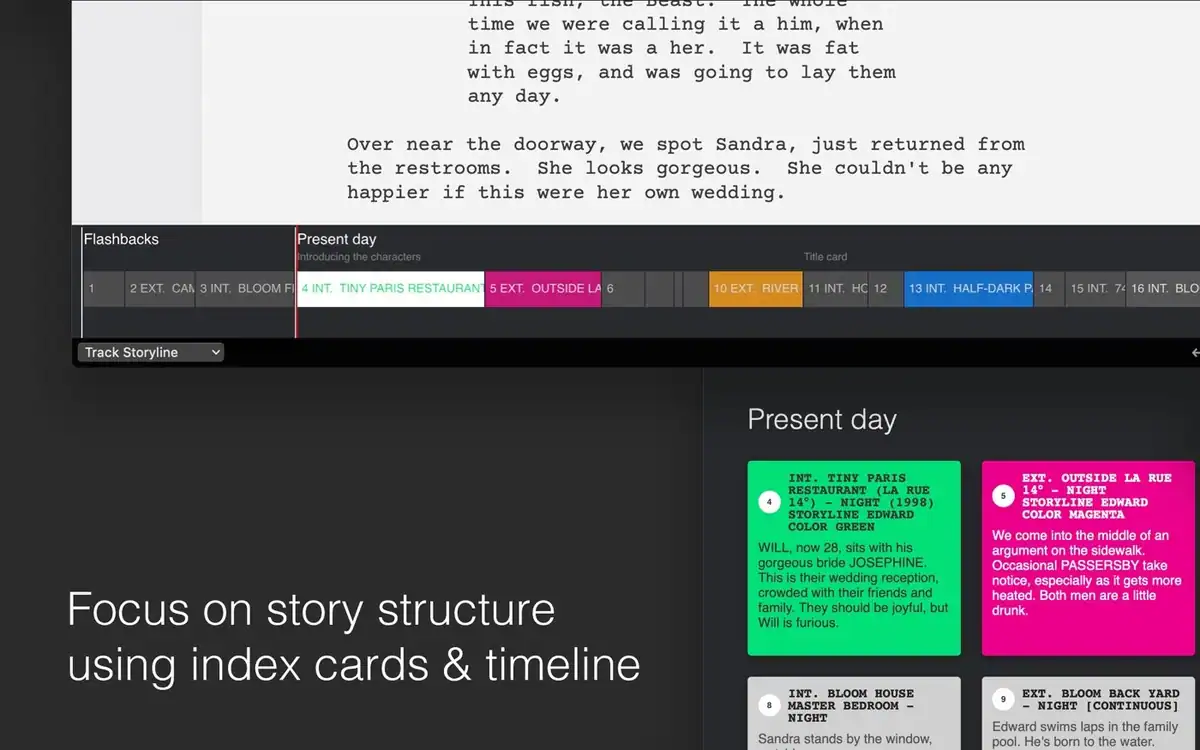
Don’t let the “free” or “open source” fool you. Beat imports and exports Final Draft files, and includes scene and character analytics that show you who’s hogging the dialogue in Act Two. There’s no AI built in, which plenty of writers will count as a positive feature when they want to focus on completing their own work. The Mac app is free; the iOS app is, however, a paid download.
Try Beat if you’re a Mac writer who love Fountain… and hate subscriptions (or are tired searching for a free Final Draft hookup).
FREE SCRIPT WRITING APP
6. Celtx
Celtx has been around long enough that a lot of working writers wrote their first short with it, and doubles as one of the most popular Final Draft alternatives available. Today, it’s a cloud platform that links your screenplay to production planning, so the script you write can turn into a breakdown and a schedule without having to retype a single prop, vehicle, or location.
The free plan is gratis forever after a seven-day trial, with one seat and one project. Revision mode, episodic scripts, and editable version history are all paid features, so it’s best for a single short or a first feature rather than a TV writer breaking out multiple episodes and even more documents.
Try Celtx if you’re a student filmmaker or writer-director who’s aiming to produce what they write, and have researched Final Draft VS a free option you can get started with.
FREE SCREENWRITING SOFTWARE WITH PRODUCTION TOOLS
7. StudioBinder
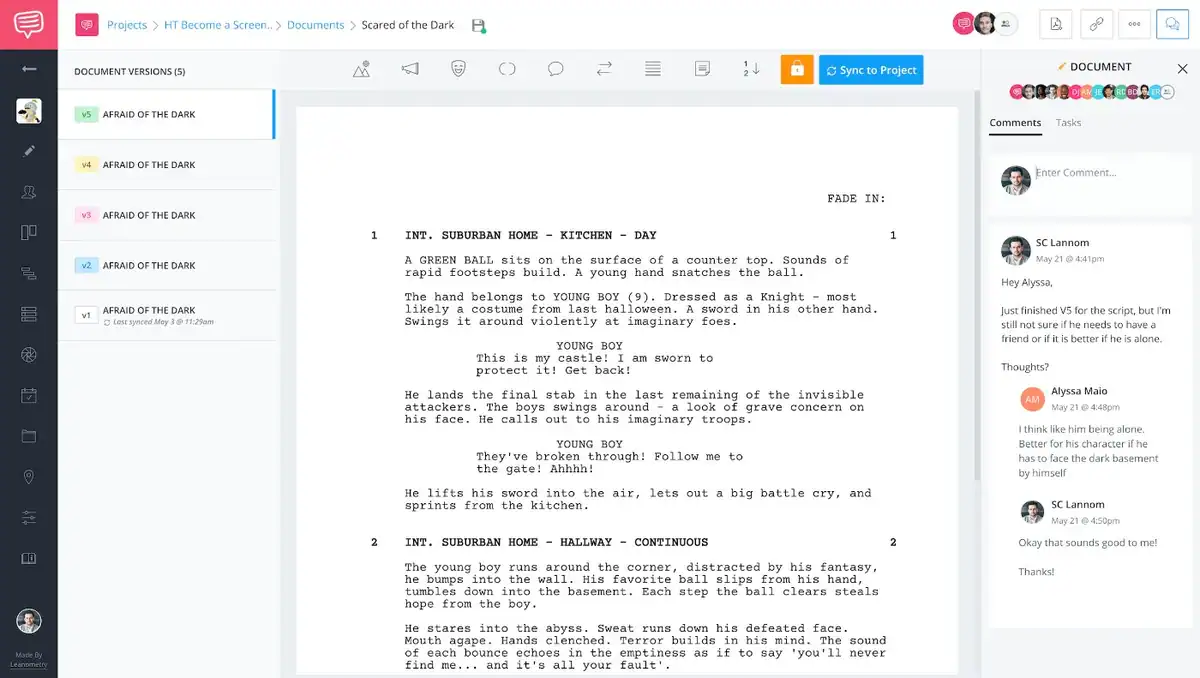
StudioBinder is best known as production management software, and its screenwriting tool plugs straight into that written word world. Write your script, then transition into breakdowns, strip boards, shot lists, and call sheets all in the same app. If that’s your whole job, see our best script breakdown software roundup for more options on getting from script to set.
The StudioBinder free plan includes one project and one screenplay, with limits on scheduling imports and other additive production features. Their free screenwriting software runs in your browser, while paid plans start at $29 a month.
Give it a chance if you’re an indie producer and writer-director who want the script and the schedule to talk to one another without a translator.
FREE OFFLINE SCREENWRITING SOFTWARE
8. WriterSolo
WriterSolo is WriterDuet’s engine with the collaboration taken out and the price set to “pay what you want“; the toll of course starts at zero. WriterSolo installs on Windows, Mac, Linux, Chromebook, and iOS, and works completely offline, which makes it a great pick for writing on a plane, in that log cabin your friend rents out, or anywhere the Wi-Fi password is a closely guarded secret (or is too hard to spell).
It’s file-based and local-first, so your scripts live on your own machine instead of in the cloud, and you can always move up to WriterDuet if you decide to add a writing partner/collaborator later in the process.
WriterSolo is best for, well, solo writers who want a free desktop app with no subscription worries and no internet required.
AFFORDABLE SCREENWRITING SOFTWARE
9. Fade In
Fade In is the honest exception on this list: it isn’t free forever, but it offers a free demo that’s one of the most complete in the business. Every feature works, apart from real-time collaboration, so you can write a full draft and see exactly where your money will be going. The catch: printed and PDF scripts are watermarked, and it nudges you to buy after 10 pages. Good if you write slow starts, but bad if you’re an Act Two ace. For someone looking for a free Final Draft equivalent, this won’t deliver that clean sheet.
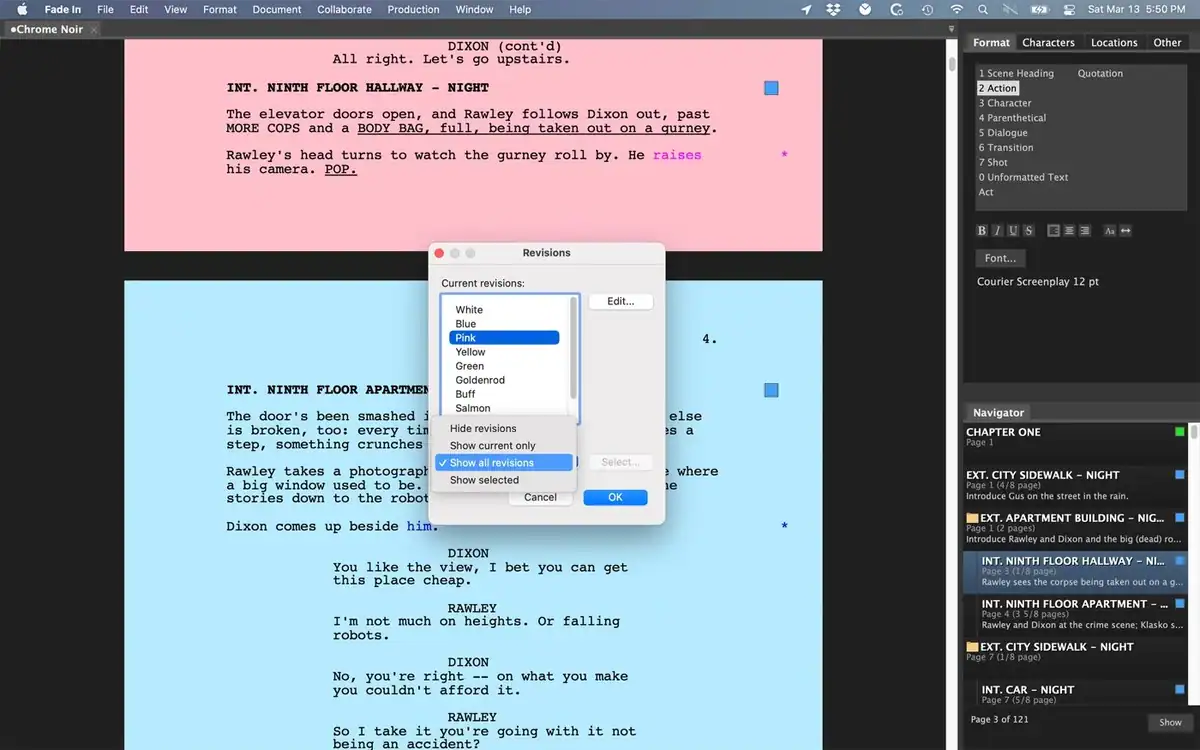
When you’re ready to go to the checkout window, it’s a one-time purchase of $79.95 rather than a subscription. Fade In is an option for Mac, Windows, and Linux, with mobile apps for iOS and Android. A lot of working writers use it as their everyday Final Draft alternative.
Fade In is best for writers who are ready to own their software outright without paying industry-standard prices (or sweating the updates).
OPEN SOURCE SCREENWRITING SOFTWARE
10. Trelby
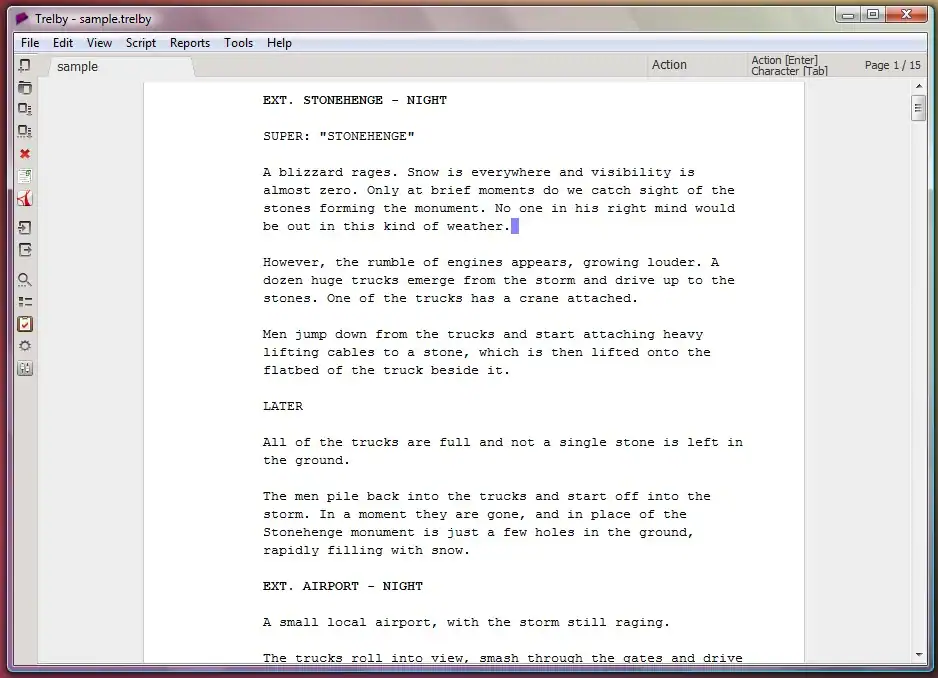
Trelby is the veteran of the open source offerings: free, lightweight, and still getting releases on GitHub. ‘member that? Trelby handles screenplay formatting, character name autocomplete, and PDF export while it runs happily on older Windows and Linux machines that would rather not be asked to open a cloud app. For the current Mac user: you may want to stick with Beat for your free open source screenwriting tool.
It’s no-frills (there are no AI-assisted table reads here), but if you want a free, private, offline script writing program that just works, Trelby has been quietly doing that for years.
Best for Windows and Linux writers who want simple, free, and offline screenwriting software.
FREQUENTLY ASKED QUESTIONS ABOUT FREE SCREENWRITING SOFTWARE
FREE SCREENWRITING SOFTWARE FAQ
What is the best free screenwriting software?
The one that matches how you work! Writing with a partner: WriterDuet. Unlimited free projects: Story Architect. Mac and Fountain fans: Beat. Windows or Linux, offline: Trelby or WriterSolo. Writer-directors heading into production: Celtx or StudioBinder. And whichever you pick, read and rewrite your drafts in Scriptation.
Where can I get free Final Draft? / Is there a free Final Draft Download available?
Nowhere, and no. Final Draft offers a free trial, but if you’re looking for a free Final Draft download you’ll be looking for a while. After the trial, it’s a paid purchase ($249.99 at full price) or a yearly subscription. Every screenwriting app or software on this list can import or export Final Draft (.fdx) files or PDFs, so you can collaborate with Final Draft users without buying it.
What free screenwriting software do professionals use?
Depends on what they can get their studio to pay for! Most staffed TV writers and studio feature writers work in Final Draft or Movie Magic Screenwriting because that’s what the show or studio already uses, but plenty of pros write in WriterDuet, Fade In, Arc Studio, or Beat and export to .fdx when it’s time to share. On set and in production, scripts are read and annotated as PDFs, which is where Scriptation comes in.
Is there free screenwriting software for Windows?
Yes. Story Architect, Trelby, and WriterSolo all install on Windows for free, and Fade In has the previously mentioned free Windows demo. WriterDuet, Arc Studio, Celtx, and StudioBinder all run free in a Windows web browser.
Is there good free screenwriting software for iPad?
Story Architect has an early iOS app, and WriterSolo runs on iOS. Most web-based apps also work in the users’ iPad browser. For reading and marking up your scripts on iPad, Scriptation is free with upgrades at the subscription level.
Can free screenwriting software export to PDF without a watermark?
Some can. WriterDuet, Story Architect, Beat, and Trelby export clean PDFs on their free versions. Arc Studio’s free plan and the Fade In demo add a watermark.
What is Fountain format?
Fountain is a plain-text screenplay format. You write in simple text, and apps like Beat, Highland, WriterDuet, and Arc Studio turn that output into a properly formatted script. Because it’s plain text, a Fountain file opens in almost any app, which makes it a great way to keep your scripts future-proof against any one screenwriting software.
CHOOSING FREE SCRIPT WRITING SOFTWARE
THE BEST FREE SCREENWRITING SOFTWARE IS THE ONE THAT GETS YOU TO FADE OUT
Free software won’t write your script for you (and as a serious screenwriter, why would you want it to?), but it removes the last excuse for not starting. Here’s where we’d begin:
First-time writers and students: Arc Studio or Story Architect.
Writing partners: WriterDuet.
Mac and Fountain fans: Beat.
Windows, Linux, or offline writers: Trelby or WriterSolo.
Writer-directors heading into production: Celtx or StudioBinder.
Then, whenever you finish the draft, do your notes and breakdowns in Scriptation. That’s where the annotations help a screenwriter read it, note it, hear it, and carry those notes into every rewrite in the process. Once your script is polished, send it out! Wondering where? Check out our list of the best screenwriting contests to find some of the best opportunities available to writers today.
Download Scriptation free for iPad, iPhone and Mac, and follow the Scriptation blog for more on screenwriting apps and tips!
