

What’s a Script Breakdown?
A script breakdown is the moment a screenplay stops being a story and starts being a shopping list. Every actor, prop, costume, car, stunt and wet-down street gets pulled out, sorted and counted, because somebody has to hire it, build it, rent it (or feed it). Skip production scheduling and you find out on the day that the “small dog” in scene 14 was never booked (the dog, Micro, was always in the script; it was just never in the breakdown). Breaking down the script, or script tagging, makes sure nothing gets left out, left behind, or left for someone else to deal with.
Here’s the reality: everyone on a production does a breakdown, whether they realize it or not. The 1st AD does one to build the production schedule. The UPM does one to build the budget. Props, wardrobe, makeup and the art department each do their own, usually with a highlighter, a stack of three-hole-punched pages and the quiet certainty that someone else already flagged the pink cowboy hat. Sadly, they did not.
The fix isn’t a bigger, fancier highlighter. It’s a shared method: the same categories, the same counting rules and a breakdown that survives every round of revision pages. So let’s walk through how to do a script breakdown the way working crews do it, using a real script page from start to finish.
WHAT IS A SCRIPT BREAKDOWN?
Script Breakdown Definition
A script breakdown is the process of reading a script scene by scene and identifying every element production needs to shoot it: cast, background actors, props, wardrobe, makeup, vehicles, sets, special effects, stunts, animals and anything else that costs money or time. Each scene’s elements go onto a breakdown sheet, and those sheets feed the production schedule (AKA shooting schedule or the stripboard), the budget and every department’s prep list.
A breakdown also measures each scene. Scripts are counted in eighths of a page, so a scene that runs three-quarters of a page is “6/8” and a full page is “1.” Those eighths tell the AD how much can realistically be shot in a day, which is why “How many pages are we shooting tomorrow?” is the most asked question on any set, right before “When’s lunch?”
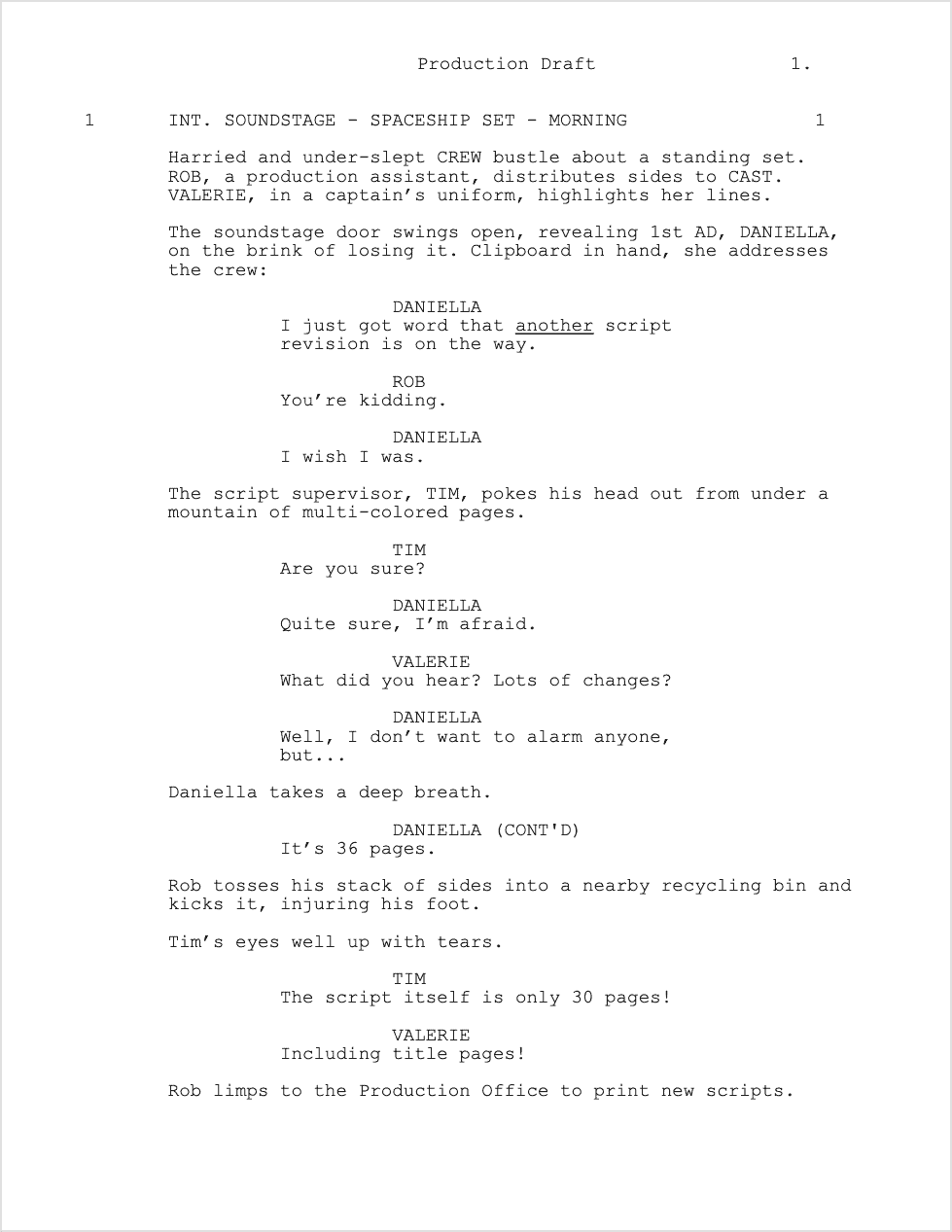
Our example for this post is Attack of the Triple Buffs, a short production draft written by the humans at Scriptation, where a crew drowning in paper revisions finally gets saved by an iPad. Page one, untouched and waiting to be broken down:
PRODUCTION SCHEDULE CATEGORIES
Script Elements Every Breakdown Tracks
Every production tweaks the list, but nearly every script breakdown sorts elements into the same core categories for the production schedule.
- Cast: speaking roles, usually numbered by size of part (the lead is #1, forever; that’s where “1 on the callsheet comes from”)
- Background: extras and silent bits
- Stunts: anything that needs a stunt coordinator, a pad or a waiver
- Props: anything an actor handles, touches, or swings
- Set Dressing: anything on the set that nobody picks up, touches, or swings
- Wardrobe: costumes, especially anything specific, damaged or vintage (costs more); if it’s getting wet/stained/burnt/damaged, you need backs ups or ‘doubles’
- Makeup and Hair: looks, from average to award show, and things like wounds, aging, tattoos, & wigs
- Vehicles: picture cars, golf carts, the spaceship (if it moves)
- Special Effects: rain, smoke, fire, breakaway glass, the Incredible Hulk
- Animals: and their wranglers; one is usually easier to talk to than the other
- Sound and Music: playback, featured songs, anything that needs clearance
- Locations and Sets: where scenes shoot, and whether that’s on our stage or at a real place (or a real place subbing in for another place)
The other half of the breakdown is the scene’s basic info, which you get straight from the slugline: interior or exterior, day or night, and the set. Those four combinations traditionally get their own strip colors on a stripboard (day interiors in white, day exteriors in yellow, night interiors in blue and night exteriors in green), so the AD can see at a glance how many company moves and night shoots are coming for the production schedule.
As for highlighter colors on the page, there’s a tradition (cast in red is the one nearly everyone agrees on), but it varies from production to production. What matters most is that everyone uses the same colors for the same script tagging categories. That’s much easier when the colors live in the app instead of in a coffee-stained legend taped to the inside of a binder.
HOW TO BREAK DOWN A SCRIPT
A Script Breakdown Example, Step by Step
Here’s how to break down a script, using the first four scenes of Attack of the Triple Buffs.
Step 1: Read it once without a pen. Seriously. Read the whole script for story first, so you know that the golf cart in scene 3 matters later and the stack of sides in scene 1 doesn’t survive the scene (Rob kicks it into a recycling bin, then injures his foot, so add a note for the medic).
Step 2: Number the scenes and measure them. On a production draft the scene numbers are already in the margins. Then count eighths. In our script, scene 1 (INT. SOUNDSTAGE – SPACESHIP SET – MORNING) runs a full page, so it’s 1. Scene 2 (INT. PRODUCTION OFFICE) is 4/8, scene 3 (EXT. BASE CAMP) is 3/8, and scene 4 (EXT. DIRECTOR’S TRAILER) is 5/8. If the eighths on a page don’t add up to 8/8, recount.
Step 3: Mark every element, one category at a time. Here’s what scenes 1 through 4 give us:
- Cast: Daniella, Rob, Tim, Valerie, Paolo, Giovanni, Andrés, Melissa, Rachel, and Franco (O.S.).
- Background: the harried, under-slept crew on the soundstage.
- Props: sides, highlighters, Daniella’s clipboard, the “mountain of multi-colored pages,” the recycling bin, the copier, the triple goldenrod pages, the walkie and Rachel’s iPad.
- Wardrobe: Valerie’s captain’s uniform.
- Makeup: Fry’s wrist tattoo, which the writers just changed to a dancing penguin (mark it now, because the makeup trailer will want to know before call time).
- Vehicles: Melissa’s golf cart.
- Sets and Locations: the spaceship set, the production office, base camp and the director’s trailer, including the very obvious sign on her door.
Step 4: Transfer it to breakdown sheets. Each scene gets a sheet with its number, set, INT/EXT, day or night, page count, a one-line description (“Daniella warns the crew about a 36-page revision”) and every element by category.
Step 5: Keep it current. And here’s where paper breakdowns die. The script will change. The next round of colored pages arrives, the penguin becomes a flamingo, and every department has to find and fix their script breakdowns by hand (if you’re new to the rainbow, here’s what blue pages are).
SCRIPT BREAKDOWN SOFTWARE
Break Down Your Script with Scriptation Tagging
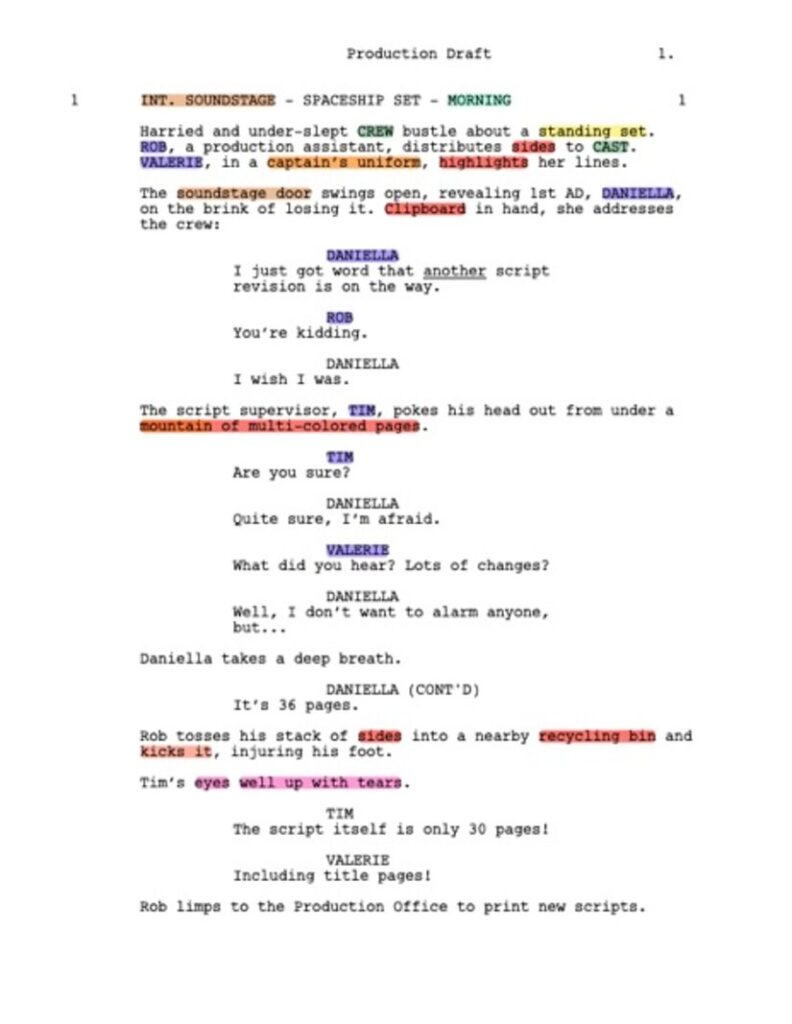
Scriptation’s Tagging turns the highlighter method into a real script breakdown, right on your script PDF. Enter Tagging mode, pick a category, and mark the element with any annotation tool: a highlight, an underline, a text box, a sticky note, even a stamp. The tag takes on that category’s color, so your cast, props and wardrobe stay visually separate on the page.
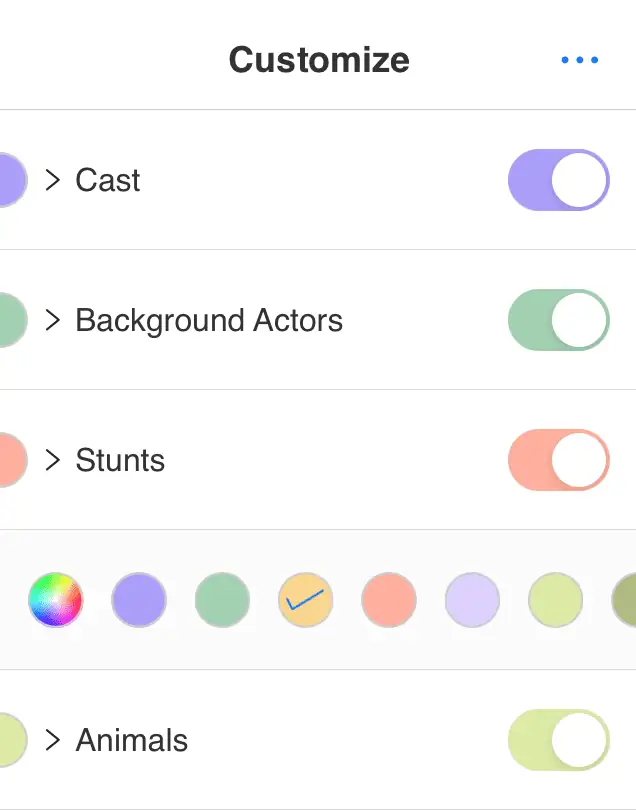
The categories are industry standard, and you can rename, recolor, reorder or hide them, or add your own (“Penguin Continuity” is a valid category if you commit to making it one. Auto Tag will automatically highlight the first speaking character in every scene, which knocks out the cast list before your coffee gets cold. You can add a note to any tag, and Special Tags let you add a Scene Description, a Story Day (your script’s continuity day) and Scene Notes for the whole thing.
The best part comes at Step 5. Your tags transfer to new revisions just like the rest of your notes, so a new round of colored pages doesn’t mean starting your script tagging over. This uses the same engine behind Note Transfer, and is the key to going paperless with Scriptation.
New to Scriptation, and want to try Tagging? Get your two week free trial of Industry Pro today!
HOW TO TAG A SCRIPT
From Tags to Breakdown Sheets and Reports
Once the script is tagged, the breakdown sheets build themselves. Scriptation exports three kinds of tagging reports, as a formatted PDF or a CSV you can open in any spreadsheet:
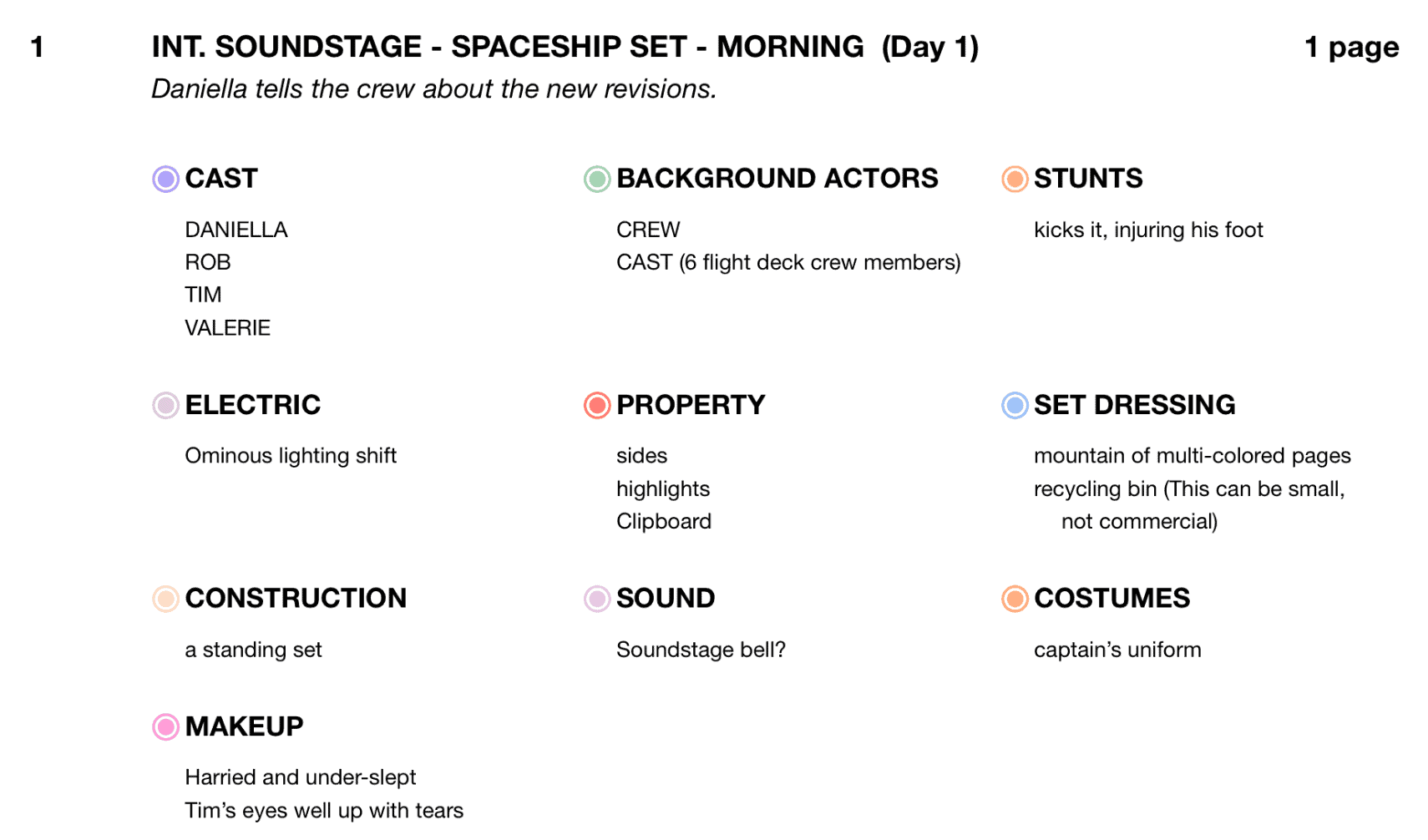
- Breakdown Summary: every tagged element in a scene-by-scene breakdown, with your scene descriptions, notes and images. This is your breakdown sheet.
- Element Report: every tag in the script, organized by category. Hand the props list to props and the wardrobe list to wardrobe (if that wasn’t clear).
- Category Report: the same as an Element Report, but you choose which categories go in it, so the makeup trailer gets only the makeup (and the penguin).
And if your production schedules or shares elsewhere, Scriptation exports tagging data to apps like Cinapse, SetHero, Shamel Studio, Shot Lister and Think Crew (with more to come).
Comparing tools? See our roundup of the best script breakdown software.
FREQUENTLY ASKED QUESTIONS ABOUT SCRIPT BREAKDOWNS
SCRIPT BREAKDOWN FAQ
Who does the script breakdown on a film or TV show?
Everyone, in their own way! The 1st AD does the master breakdown that builds the production schedule. The UPM or line producer uses it for the budget. Each department head (props, wardrobe, makeup, art, locations) breaks down the script for their own department, and the script supervisor tracks continuity on top of it all.
What is an eighth of a page in a script breakdown?
Script pages are divided into eighths, roughly an inch of page each, to measure how long a scene is. A half-page scene is 4/8, a page and a half is 1 4/8, and the schedule adds up the eighths to plan each shoot day.
What’s the difference between a script breakdown and a shooting schedule?
The script breakdown lists everything each scene needs. The production schedule puts those scenes in shooting order, usually grouped by location, cast and day or night, and it’s built from the breakdown sheets. Breakdown first, schedule second, call sheets every day after that.
What colors are used in a script breakdown?
Each category gets its own highlighter color, and there’s a traditional color key, but it changes from production to production. The one firm convention is on the stripboard: white for day interiors, yellow for day exteriors, blue for night interiors and green for night exteriors.
Is there free script breakdown software?
Yes, several breakdown tools have free plans or free trials, and our script breakdown software roundup (linked in the section above) compares them. Scriptation is free to download, and Tagging is part of Industry Pro, which you can try free for two weeks.
Do I have to redo my script breakdown when revised pages come out?
Not in Scriptation. Tags transfer to the new revision along with the rest of your notes, so you only update what actually changed. On paper? Get the highlighters back out.
PRODUCTION SCHEDULING TIPS
SCRIPTATION TAGGING: THE FASTEST WAY TO DO A SCRIPT BREAKDOWN
A script breakdown is where the dancing penguin tattoo gets caught before the shoot day instead of an hour into it. Do your breakdown scene by scene, count your eighths, use one shared color key and keep it alive through every revision, and the whole production runs on the same list.
Now, do your script breakdown in Scriptation? You’ll never transfer a highlighter mark by hand again. For the rules behind the pages you’re breaking down, see our guide on how to format a script.
Download Scriptation free for iPad, iPhone and Mac, and follow the Scriptation blog for more on production prep!